
SolarAnywhere® Sites users can import time-series data files into PowerUQ for energy uncertainty and yield assessments.
Follow the steps below to get started:
- In PowerUQ, navigate to the Project Configuration tab. Create or upload your configuration.
- Under Site Info, open the Weather, Location, and Time module.
- Select Change, then CSV as the source and SolarAnywhere as the provider.
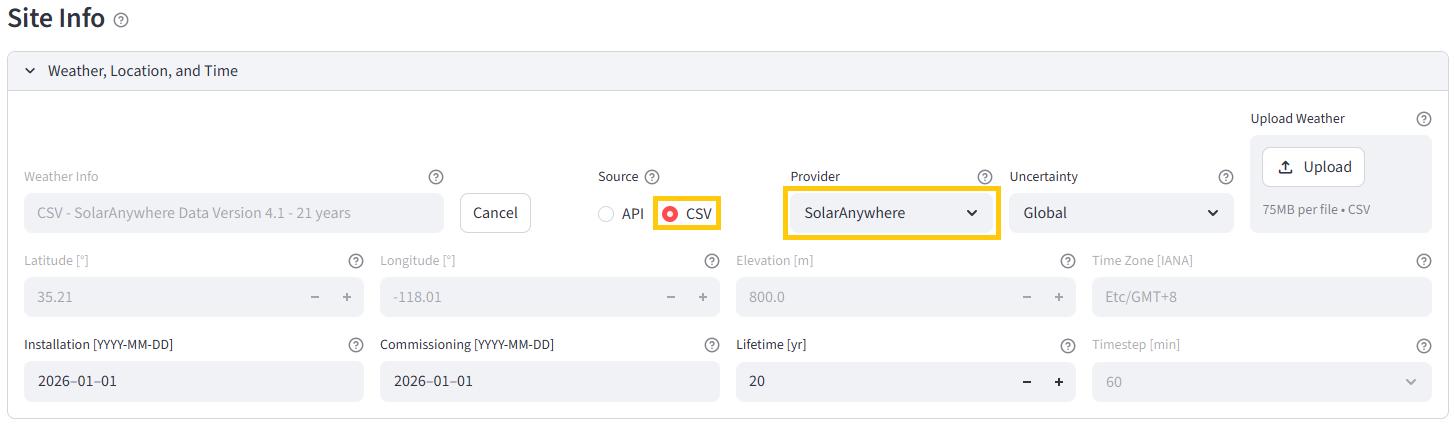
- Change the data uncertainty based on region or climate type.
- Select Upload, find your SolarAnywhere file and select Open.
Files must be 75MB or less and be either 60- or 30-minute temporal resolution. At this time, Typical Year and PXX files are not supported by the PowerUQ file import.
If you run into an error, contact us at support@solaranywhere.com.